Posts

Showing posts with the label jquery

SharePoint List View Cell formatting with CSR
Image
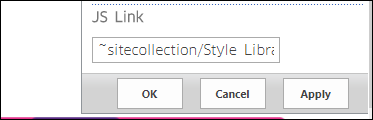
Client Side Rendering Client-side rendering is a new concept in SharePoint 2013. It allows you to use your own output format in a SharePoint page (list views, display, add and Edit forms). How to deploy the JSLink templates You can deploy those JSLink files in many ways. I describe in the samples below how to deploy JSLink files using OOTB techniques, but you can also use Script Editor or other techniques. Before proceeding , you have to upload the JavaScript code files on your SharePoint 2013 site. You can upload to any SharePoint document library, or _layouts folder, But in the below deployment steps I’m supposing you will upload the JSLink-Samples folder to the site collection Style Library. 1. Edit the List view page 2. Edit the List View webpart. 3. Go to List view web-part properties and add the JSLink file (~sitecollection/Style Library/<any subfolder>/jsfile.js) to JS link property under the Miscellaneous Tab. Remember- you have to hard code the ini...

Simple Risk Assessment Matrix table with resultant risk calculation

Image
This post is not related to SharePoint and can be used in any web application with simple html and Jquery. I was preparing a risk matrix table for one of my projects and thought it is worth sharing it here. " A Risk Assessment Matrix is a project management tool that allows a quick view of the probable risks evaluated in terms of the likelihood or probability of the risk and the severity of the consequences. " . Let us build the below table. Once you have the page ready, you can calculate the resultant risk by passing the likelihood and the severity to the page using query-strings. For example your page is riskMatrix.html, then: http://mySitename/pages/riskMatrix.html?L=2&S=3 , so here Likelihood=3 and Severity=3, so the resultant risk is highlighted as M. Below is the complete code HTML, CSS and JS. Make sure you have referenced bootstrap and jquery (offline copy/CDN) in your page. <table class="table table-bordered table-responsive...

Create SharePoint Page and redirect to the page with edit mode

I recently found one of our clients struggle in creating a page in pages library. The process follows like this: Go to Pages library New Document Enter page name, description, select layout Click create. ->creates the page and redirects to the default view of the library. Search for the page you have just created, open the page Edit the page using the ribbon. So if you could see the struggle to create a page and reach to the edit page. So client asked me to simplify this. I found a stack-overflow post very useful and this blog post is inspired by that stack-overflow post. Solution: Put this code in a js file and refer this file in your master page. $(document).ready(function () {  var currentAddress = window.location.pathname;     if (currentAddress.toLowerCase().indexOf('/createpage.aspx') == -1) // not the creation page page         return;     $("input[id$='buttonCreatePage']").each(function () {   ...

How to open files/documents in SharePoint document library is new tab

As you know documents in SharePoint document library (images, pdf files etc) always opens in the same page and it leaves you from the SharePoint context. You can not go back to SharePoint from that page unless you press the back button of your browser. Here is a fix/workaround for this problem. Put below code to a js file and refer this file in your master page.  try {               //Below code is for opening document library files(pdf,jpg) in new tab         // has to be on an interval for grouped doc libraries         // where the actual links are loaded only once a group         // is expanded         setInterval(           function () {               $("a[onclick*='return DispEx'][target!='_blank'][aria-label$='pdf File'],a[onclick*='return DispEx'][target!='_blank'][aria-label$='jpg File']") ...

Kendo UI (Core JavaScript) grid Server Paging, Server Sorting and Server Filtering with Dynamic SQL queries

Image
Kendo UI (Core JavaScript)  grid Server Paging, Server Sorting and Server Filtering with Dynamic SQL queries Introduction Writing this post after a long time. Came across Kendo UI components in one of the projects. Kendo UI Grid (paid!) is one of the amazing html components from Kendo with excellent features like filtering, sorting, grouping, re-arranging, paging etc. Problem I recently came across a requirement where I had to pull data from MSSQL server and display it on a kendo grid. But it was about pulling thousands of records to the grid, which would slow down the app for the first time, but I did not want that to happen. So thought of implementing kendo Server paging which is readily available with Kendo Grid. But since I use Kendo UI core pure JavaScript framework and not the kendo wrapper for asp.net mvc etc, paging, filtering and sorting need to be handled manually by the developer. After Googling for a while, I did not find any help relevant to implementati...

JQery helper methods

In this post I am gonna give you some of the JQuery helper methods which I am using in my application frequently. Below are some of them , with explanation: Usage: Copy all the codes given at the end of this post to a js  file and add a reference of it to your page. Or  Click here to download the file 1. Remove Special Characters from a string: var str="Hello%how%are$you"; str.removeSplChars(); output : Hellohowareyou 2. Trim from left: var str="%hello"; str.trimStart('%'); Output:  hello 3. Trim from right: var str="hello%"; str.trimEnd('%'); Output: hello 4. String Contains: var str="welcome to SPShell. The SharePoint blog"; str.contains("SharePoint"); Output: true 5. IsUndefined. var undefinedVar; IsUndefined(undefinedVar); Output: true 6. isIEBrowser  (check is browser is IE) isIEBrowser(); Output: false (my browser is chrome when I excecuted this code)  . 7. checkChrome c...

Setting maxlength to a textarea

The maxlength attribute is new for the <textarea> tag in HTML5 . But what if  you are not using html5 or what if your browser doesn't support this attribute. You might have faced this issue where you being not able to set maxlength property to a textarea. So here is the trick using the power of Jquery  :P. var maxLength = 50; //Set the length here $(document).ready(function(){ setMaxLenTexrArea(); }); function setMaxLenTexrArea() {     $("textarea").each(function () {         $(this).on('change keydown keyup keypress paste blur', function () {             restrictLength($(this).prop('id'));         });     }); } function restrictLength(ta) {       var txtVal = $("#" + ta).val();     if (txtVal.length > maxLength) {         txtVal = txtVal.substring(0, maxLength);         $("#" + ta).val(t...

SharePoint 2013/Online: Get current logged in user's groups using javascript

This Post explains how to get current logged in users Groups using javascript. Its a simple ajax call to the sharepoint service. Use the below code $(document).ready(function () {      var userid = _spPageContextInfo.userId; getCurrentUserGroups(userid); }); function getCurrentUserGroups(UserID) {     $.ajax({         url: _spPageContextInfo.webAbsoluteUrl + "/_api/web/GetUserById(" + UserID + ")/Groups",         type: "GET",         headers: { "Accept": "application/json; odata=verbose", "X-RequestDigest": $("#__REQUESTDIGEST").val() },         dataType: "json",         async: true,         success: function (data) {             /* get all group's title of current user. */             var results = data.d.results;             for (var ...

How to hide a ribbon in SharePoint 2010/2013/Online using Jquery

This post explains how to hide a SharePoint Ribbon in SP 2010/2013/ SP Online using jquery. It is very simple jquery code to hide the ribbon. For example say suppose you want to hide Add New Item Ribbon in a List called Contacts. Here is how efficiently we can achieve this. $(document).ready(function () {     var currentPage = decodeURIComponent(window.location.href.replace(/\+/g, " "));     if (currentPage.contains("Lists/Contacts")) {       window.setTimeout(hideRibbon, 500);     } }); function hideRibbon() {     $('span[id^="Ribbon.ListItem.New.NewListItem"]').hide()     window.setTimeout(hideRibbon, 200); } Above simple jquery code does the trick. As you can see, if the url is lists/contacts, we are calling the method   hideRibbon with a delay. And in the hideRibbon method we are calling the same method again with a delay. which will keep hiding the ribbon. Happy coding :)