Posts

Showing posts with the label sharePoint Online

Disable list view selection for users on SharePoint Online using SPFx Application Extension
Image
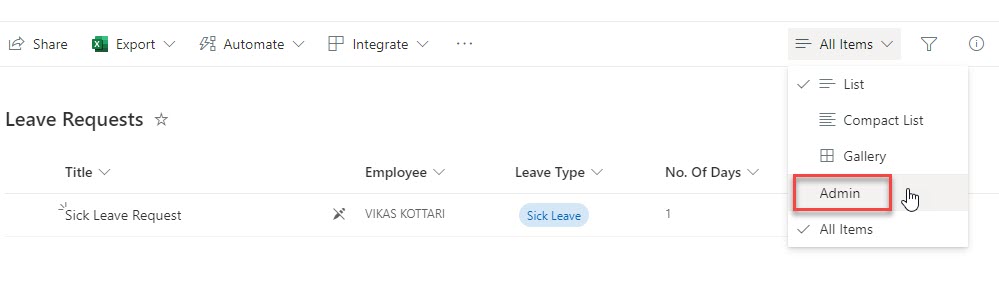
 Recently we ran into an issue on SharePoint Online that user should be able to see only their records in a list and not otehrs. So we had updated the default list view filter with Employee equal to [Me].  We have also created a view "Admin" with no filter so admins can see all records. However, the view selection is still enabled as they have View permission and hence the users can switch to Admin views and see all records, see below screenshot: So to solve this issue, we created a very simple SPFx Application customizer extension such that it hides the entire list comand bar for normal users, and shows it for only site admins. See the end result for Site admins and Normal users: Open the node.js command prompt and start eith the yeoman scaffolding: Select the type of client-side component as Exension Select the type of extension to be Application Customizer Open the solution in VS Code Create a new CSS file in this path: src > extensions > appExtensionDemo > mysty...
How to open files/documents in SharePoint document library is new tab

As you know documents in SharePoint document library (images, pdf files etc) always opens in the same page and it leaves you from the SharePoint context. You can not go back to SharePoint from that page unless you press the back button of your browser. Here is a fix/workaround for this problem. Put below code to a js file and refer this file in your master page.  try {               //Below code is for opening document library files(pdf,jpg) in new tab         // has to be on an interval for grouped doc libraries         // where the actual links are loaded only once a group         // is expanded         setInterval(           function () {               $("a[onclick*='return DispEx'][target!='_blank'][aria-label$='pdf File'],a[onclick*='return DispEx'][target!='_blank'][aria-label$='jpg File']") ...

SharePoint Online (O365) OAuth Authentication | Authorizing REST API calls against SharePoint Online Site | Get Access token from SharePoint Online | Set up OAuth for SharePoint Online Office 365

Image
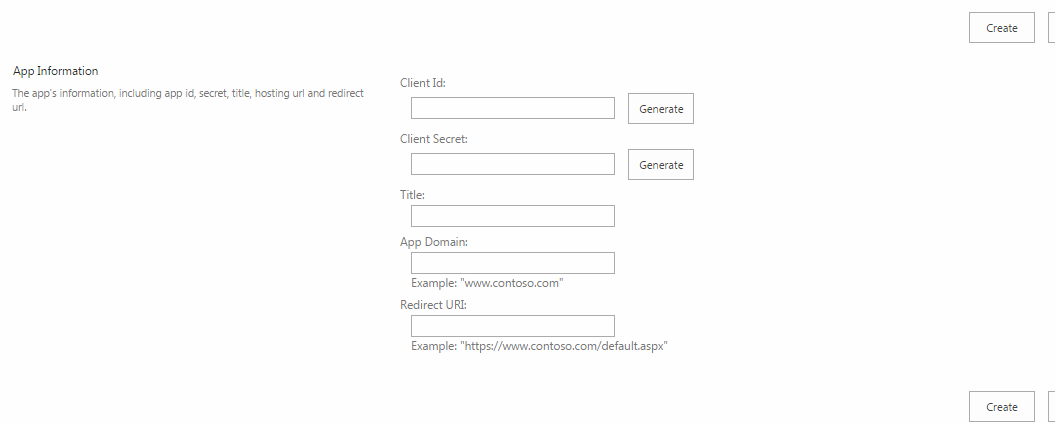
Here is my most awaited post on how to set up OAuth for SharePoint Online so that we can authorize REST API calls to the SharePoint site to retrieve data and manipulate the site data. The steps going to be easy and I will demonstrate along with screenshots and examples with the Google PostMan RESTClient . I have explained the steps below which follows the OAuth 2.0 protocol. All the steps are straight forward, but constructing the URLs are little tricky! Below are the detailed steps: 1.  Register an app in SharePoint ·          Navigate to https://your_site_name.com/_layouts/15/appregnew.aspx ·          Click Generate for Client Id and Client Secret. ·          Give a name for the app, fill in the app domain (ex: www.google.com , www.salesforce.com ). Enter the Redirect URL, important here is when entering redirect url, it should be https ...