Posts

SharePoint Online (O365) OAuth Authentication | Authorizing REST API calls against SharePoint Online Site | Get Access token from SharePoint Online | Set up OAuth for SharePoint Online Office 365
Image
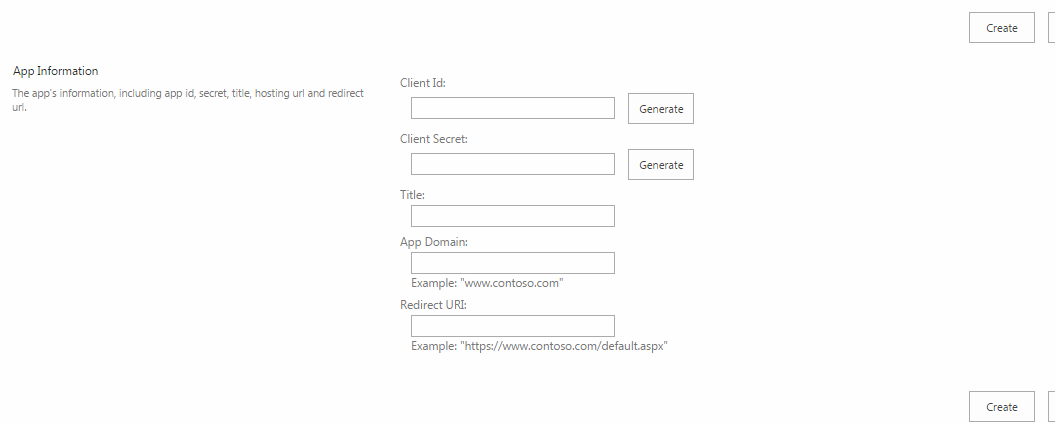
Here is my most awaited post on how to set up OAuth for SharePoint Online so that we can authorize REST API calls to the SharePoint site to retrieve data and manipulate the site data. The steps going to be easy and I will demonstrate along with screenshots and examples with the Google PostMan RESTClient . I have explained the steps below which follows the OAuth 2.0 protocol. All the steps are straight forward, but constructing the URLs are little tricky! Below are the detailed steps: 1.  Register an app in SharePoint ·          Navigate to https://your_site_name.com/_layouts/15/appregnew.aspx ·          Click Generate for Client Id and Client Secret. ·          Give a name for the app, fill in the app domain (ex: www.google.com , www.salesforce.com ). Enter the Redirect URL, important here is when entering redirect url, it should be https ...

JQery helper methods

In this post I am gonna give you some of the JQuery helper methods which I am using in my application frequently. Below are some of them , with explanation: Usage: Copy all the codes given at the end of this post to a js  file and add a reference of it to your page. Or  Click here to download the file 1. Remove Special Characters from a string: var str="Hello%how%are$you"; str.removeSplChars(); output : Hellohowareyou 2. Trim from left: var str="%hello"; str.trimStart('%'); Output:  hello 3. Trim from right: var str="hello%"; str.trimEnd('%'); Output: hello 4. String Contains: var str="welcome to SPShell. The SharePoint blog"; str.contains("SharePoint"); Output: true 5. IsUndefined. var undefinedVar; IsUndefined(undefinedVar); Output: true 6. isIEBrowser  (check is browser is IE) isIEBrowser(); Output: false (my browser is chrome when I excecuted this code)  . 7. checkChrome c...

Setting maxlength to a textarea

The maxlength attribute is new for the <textarea> tag in HTML5 . But what if  you are not using html5 or what if your browser doesn't support this attribute. You might have faced this issue where you being not able to set maxlength property to a textarea. So here is the trick using the power of Jquery  :P. var maxLength = 50; //Set the length here $(document).ready(function(){ setMaxLenTexrArea(); }); function setMaxLenTexrArea() {     $("textarea").each(function () {         $(this).on('change keydown keyup keypress paste blur', function () {             restrictLength($(this).prop('id'));         });     }); } function restrictLength(ta) {       var txtVal = $("#" + ta).val();     if (txtVal.length > maxLength) {         txtVal = txtVal.substring(0, maxLength);         $("#" + ta).val(t...

LINQ: Dynamic Groupby, OrderBy, and Dynamic Aggregates.

How to dynamically achieve groupby, orderby and aggregates using LINQ ? huh.. what..? Is it is possible.. yes it is.. Here is the solution. Here are some of our helper methods: private static object GetPropertyValue(object obj, string propertyName)         {             return obj.GetType().GetProperty(propertyName).GetValue(obj, null);         } private static double GetPropertyValueDouble(object obj, string propertyName)         {             double ret = Convert.ToDouble(obj.GetType().GetProperty(propertyName).GetValue(obj, null));             return ret;         } Consider below sample example:  public class test     {         public string City { get; set; }         public string Name { get; set; }         public string State {...

C#: How to dynamically invoke a method from a Class, when you know the ClassName and Method Name as string

How to invoke a method from a Class, when you know the ClassName and Method Name as string in C#. Here is the Solution. Consider below helper method: (change the namespace, version and public key tokens accordingly)  public static Type GetTypeFromClassName(string ClassName)         {             string ss = string.Format("Solutions.Common.{0}, Solutions.Common, Version=1.0.0.0, Culture=neutral, PublicKeyToken=3a6a3aa5a3aed1e3", ClassName);             Type typeYouWant = Type.GetType(ss);             if (typeYouWant != null)             {                 return typeYouWant;             }             return null;         } For explanation of above method, read my below post. Creating Object of a Class ...

Creating Object of a Class dynamically when you have name of the Class as string in C#?

How to create an object of a class dynamically when you have the name of class as string in c#. Here is the solution. First, get the type of the class. Below helper method Returns the Type of your class. Here Solutions.Common is the Namespace of your class. To get the Version and PublicKeyToken, go to run (window+r) , type assembly, search for your assembly , right click , properties and get these details.  public static Type GetTypeFromClassName(string ClassName)         {             string ss = string.Format("Solutions.Common.{0}, Solutions.Common, Version=1.0.0.0, Culture=neutral, PublicKeyToken=3a6a3aa5a3aed1e3", ClassName);             Type typeYouWant = Type.GetType(ss);             if (typeYouWant != null)             {                 return typeYouWant;     ...

Reading List and List Attributes of List using REST API SharePoint 2013

We can read a SharePoint List/Library and its all attributes by consuming the REST endpoint: http://server/_api/lists/getbytitle('listname') For example, below url retrieves all the attributes of the library (or list) Account . https://xxx.sharepoint.com/_api/lists/getbytitle(‘ Account’ ) Example JSON response (part of it) from the above REST call. Marked are some of the attributes required for us:   "AllowContentTypes": true,         "BaseTemplate": 101,         "BaseType": 1,         "ContentTypesEnabled": false,         "CrawlNonDefaultViews": false,         "Created": "2015-01-05T11:06:56Z",         "DefaultContentApprovalWorkflowId": "00000000-0000-0000-0000-000000000000",         "Description": "", ...